
When deploying RHEL (Red Hat Enterprise Linux), it’s worthwhile to see where a specific version is within its lifecycle. Red Hat displays life cycle details for their operating systems on their official website. You can find it here.
Left alone and when leveraging subscription-manager, by default which is my preference, running ‘dnf update’ will advance the system along from version to version. For example, 9.7 will roll forward to 9.8 as a result of performing a dnf update. This assumes that you did not version lock the OS to a specific version. If an environment requires you to stay strictly on a 9.x minor version (for example, due to third-party software or kernel module certifications), you need to take action.
Determining the State of Version Locking
To determine if a server is locked or pinning to a version, drop to bash shell and run this command:
subscription-manager releaseIf the output is ‘Release not set’, you are not locked to a specific version.
If the output is ‘Release: 9.7’, you will remain locked at version 9.7
If you want to disable version locking, allowing the OS to upgrade naturally to 9.8, run this command:
subscription-manager release --unsetIf you want to enable and version lock the OS to version 9.7, for any reason, do this:
subscription-manager release --set=9.7
sudo dnf clean all
Running ‘dnf clean all’ should remove any metadata from the package manager that targets an alternate version like 9.8.
You can then confirm that you are version locked by running below commmand
subscription-manager releaseThe output should be ‘Release: 9.7’
RHEL Version Numbers
I’m not sure why this is not universally accepted as I’ve stumbled upon various forum posts where this is argued, but my take is that RHEL odd numbered minor versions (9.1, 9.3, 9.5, and so on) have short support lifecycles and do not get Extended Update Support (EUS). Even numbered minor versions (9.2, 9.4, 9.6, and so on) have longer support life cycles and do get Extended Update Support (EUS). See below which is from RedHat.com, if you don’t believe me!
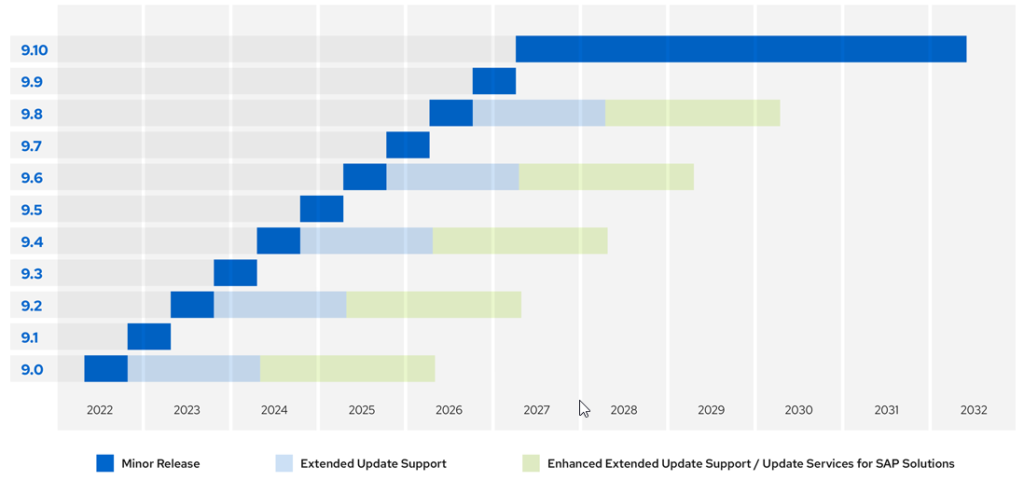

The takeaway is that if you deployed version 9.0 in 2022, and you run dnf update frequently and roll forward to the latest minor releases, you will keep the underying system in a supported state into 2032.
Support Lifecycle Stages
Red Hat breaks its standard 10-year major OS lifecycle (like RHEL 9) into two distinct 5-year halves: Full Support and Maintenance Support. The simplest way to think about the difference is: Full Support is about growth and updates (features + security), while Maintenance Support is strictly about survival (keeping it secure and stable without touching the underlying design).
- Full Support, yrs 1 to 5 – includes Security Updates, Bug Fixes, New Features, Hardware Enablement
- Maintenance Support, yrs 6 to 10 – only includes Security Updates and Urgent Bug Fixes