I’ve found myself in several discussions about Single Sign-On (SSO) over the last few months and figured this would be a good place to capture some of the highlights.
I think a good place to start is to explain what SSO is. My best crack at this is to say that it’s an authentication mechanism that allows a user to log in with a single user ID and password, to any of several related, yet independent, applications. For example, maybe at work, you log in to your computer with a username and password. Then using that same account (identity), you sign in to various applications (services) like your productivity suite (maybe Outlook in M365), or you submit PTO request in a HR platform (perhaps Workday), or you access a CRM application (like Salesforce). The main point is that you used the same exact identity to access all these services.
I think another point to raise up front is why does it matter? Well, I suppose it depends on who you ask but my take is:
- A better end user experience because there’s less friction. In the end, there’s one username and password to remember. This eliminates headaches related to keeping track of different credentials or different password policies.
- Improved hygiene and security posture. In a scenario, where someone leaves an organization, you can disable one account (identity) and access to all SSO-linked applications (services) are disabled. Without this, someone would need to tediously manage account disablements, across many applications, which could lead to continued access to company resources and administrative fatigue. This is commonly referred to as centralized revocation.
- Reduced service desk requests and management overhead.
With all that out of the way, let’s get into how this works!
There are a few ways to tackle SSO. In this write-up, we’re specifically talking about using the SAML Protocol. Security Assertion Markup Language (SAML) is an XML-based framework that allows a Service Provider (SP, the application you want to access like Workday) to delegate authentication to an Identity Provider (IdP, the system that holds your credentials like Microsoft Entra). Commonly, an IT team configures SAML SSO between all applications and the organizations trusted Identity Provider. Below is a visual representation, from Microsoft Learn. It displays the sequence of events that occur with a common SAML SSO configuration using Microsoft Entra ID as the Identity Provider (IdP).
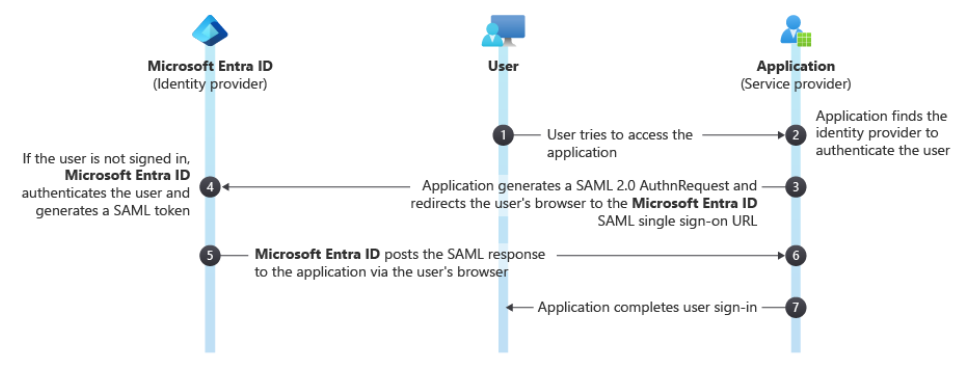
In thinking about our examples above, here’s what this looks like in practice:
- A user opens their web browser and accesses an application like their CRM. Going forward, we will call it the ‘Service Provider’
- The Service Provider is aware that SSO is configured for this application and knows which Identity Provider is responsible for authenticating the user
- The application generates a SAML authentication request and redirects the user’s web browser to the Identity Provider.
- Assuming you’re not logged in, the Identity Provider requests your username, password, and likely challenges you with 2FA. Once the Identity Provider is confident that you are who you say you are (a successful authentication), it issues you a SAML token (remember this for later).
- The Identity Provider posts the SAML response and sends the user’s web browser back to the Service Provider
- The Service Provider validates the SAML assertion, checking the digital signature to assure it came from the Identity Provider and that it was not tampered with
- If everything checks out, the Service Provider presents the application to the user
One of the interesting things here, and it may be perceived as witchcraft if you’re not aware, is that you have a valid token from your Identity Provider and that it’s stored in your web browser. This token was issued to you by the trusted Identity Provider in step 4, from above. When you click on a new application, like moving from your CRM to your HR platform to request some well deserved PTO, the HR platform sends you to the Identity Provider. Since you have a valid token, you’ll most likely automatically access the HR platform without being prompted at all.
In closing, enabling and supporting SSO across all applications is a good thing to aim for. It makes things more secure, more manageable, and results in less friction which is super important to consider in the ever-changing tech landscape.